Lyrics Sync Studio
Tap the beat, get an .lrc file.
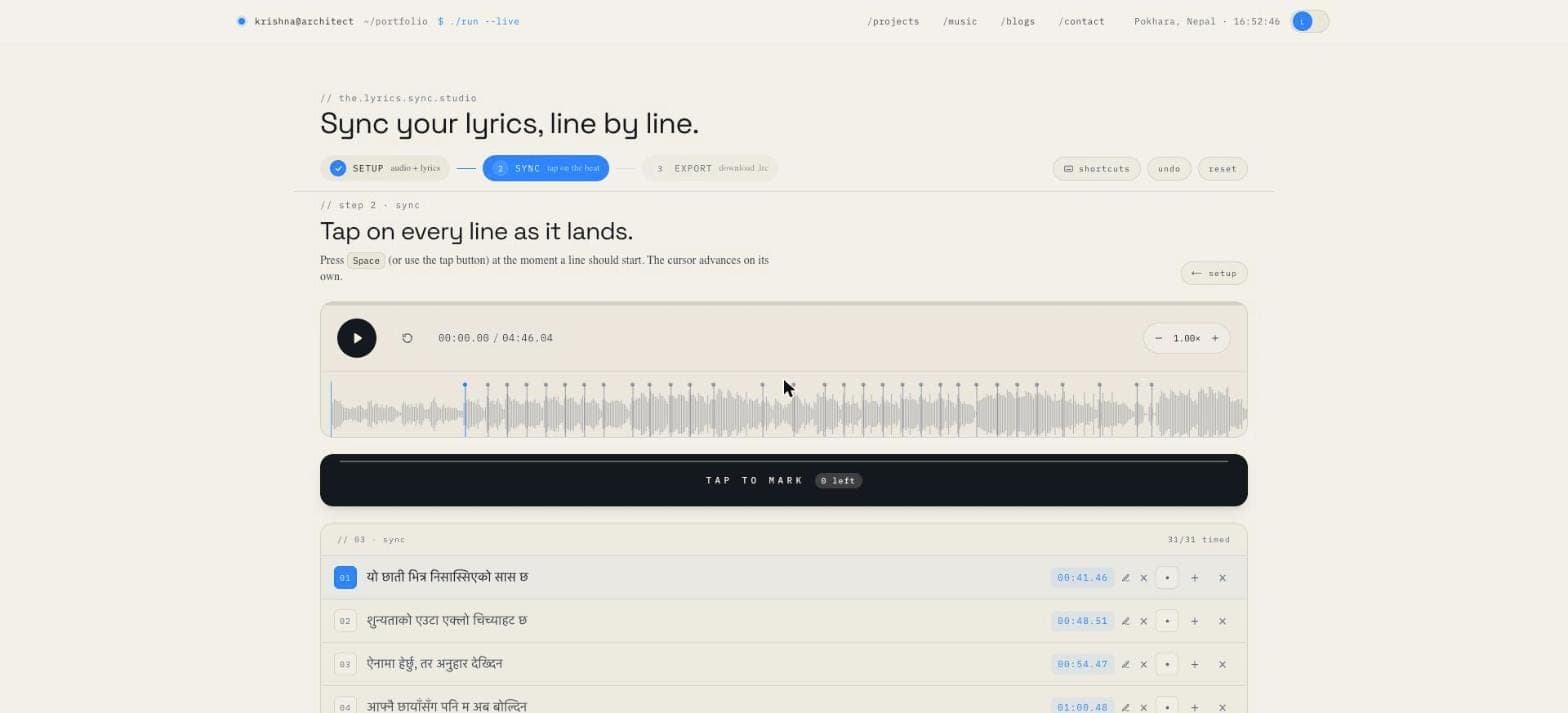
A browser-based tool for timing lyrics to audio, line by line. Drop a track, tap Space on every line, and export LRC, SRT or JSON. Nothing is uploaded — the audio never leaves your machine. Built to sync my own songs, and it feeds the music player on this site.
the problem, which is mine
I write gazals and songs in Nepali. I wanted them on this site the way you'd actually want to read lyrics — scrolling in time with the audio, the current line lit up, karaoke-style. That format is called LRC, and it's a plain text file where every line carries a timestamp.
The way you get one of those is by timing every line by hand.
The tools that exist for this are mostly fine and mostly disqualifying. The good ones are desktop software aimed at karaoke producers. The convenient ones are websites that want you to upload your unreleased track to their server, which is a strange thing to ask of a musician. The rest are abandoned Java applets. All of them assume you already know what LRC is.
I had three songs to time and a strong preference for not uploading unreleased audio to a stranger. So the tool went on my own site.
the loop
The part I like most is that this closes a circle.
The studio produces LRC. A small function turns that LRC into the literal shape the track data uses. The music section reads that data and renders it through the same synced-lyrics component the player uses. And /music links back into the studio with ?track=<id>, which pulls the song's audio and its existing timings straight in — so re-timing a line I got slightly wrong is two clicks, not a re-import.
Tool feeds player, player feeds tool. The whole thing lives in one repository and none of it talks to a server.
the interesting bit: your reaction time is a bug
The core interaction is: play the song, hit Space when each line should start. It is a rhythm game where the prize is a text file.
The problem is that humans are late. Between hearing the moment and pressing the key, you lose something like 80–150ms, consistently. Every timestamp you produce is therefore slightly behind the music, and the effect is worse than it sounds: lyrics that lag are noticeably wrong in a way lyrics that lead are not.
You could ask the user to guess an offset and nudge it. Instead the tool measures it.
The waveform is already decoded into amplitude buckets to draw it. So for each line you timed, it looks in a ±300ms window around your tap for the loudest peak — which, for sung lines, is usually the actual onset. The difference between your tap and that peak is your personal lateness for that line. Take the median across every timed line and you have a global offset to apply on export.
Median rather than mean, because a handful of lines will sit over instrumental swells or silence and produce garbage deltas; the median ignores them where an average would be dragged around. And the median absolute deviation comes back alongside as a confidence figure: tight spread means you tapped consistently and the number is trustworthy, wide spread means you were guessing and should not blindly apply it.
It's maybe eighty lines of code and it's the difference between an export that feels right and one that feels almost right.
the rest of it
Three stages — setup, sync, export — because that's genuinely the shape of the task.
Setup takes an audio file by drop or picker (MP3, WAV, M4A, OGG, FLAC) and lyrics as either plain text, one line per row, or an existing LRC, SRT or JSON file if you're revising rather than starting fresh.
Sync is keyboard-first, since your hands should never leave the keys: Space to mark and advance, K to mark without advancing, Backspace to clear the current line, Tab to jump to the next untimed line, R to restart, arrows to scrub, ? for the shortcut sheet. There's a speed control, because timing a fast chorus at 0.75× and exporting at full speed is the obvious trick nobody's tool offers.
Export writes LRC, SRT or JSON, with the calibrated offset applied and a manual nudge on top if you disagree with it.
Projects persist to local storage between visits, with a migration path from the first storage format I shipped — versioning your own local data is one of those things that feels paranoid right up to the first time you change the shape of it.
The parsing and formatting are covered by unit tests: timecode round-tripping, LRC and SRT parsing, format detection on import, and the calibration maths. They're pure functions, which makes them the easy and obvious thing to test, so there's no excuse not to.
the player half
The music section is the other end of the loop and got its own attention.
Audio runs through the Web Audio API — an audio element wired into an analyser node — so the circular visualiser is driven by real FFT data rather than a decorative animation pretending to be one. It draws to canvas on an animation frame, and an intersection observer pauses the whole loop when it scrolls out of view, because a 60fps canvas has no business running for a component nobody is looking at.
The synced lyrics component takes the timings the studio produced and highlights the current line as the track plays. Which is where this started.
why a fun project earns its place
This isn't infrastructure. It timed three songs.
But it's the kind of project I think is worth doing anyway: a real problem I actually had, a tool small enough to finish in a weekend, and one genuinely interesting sub-problem — the calibration — that I would not have gone looking for otherwise. It also happens to be the only project here you can use right now, in this tab, without installing anything or trusting me with a file.
Drop a song in and time a verse. It takes about a minute to understand and the export is a real .lrc.